
Clean Web Reader for Clear Articles
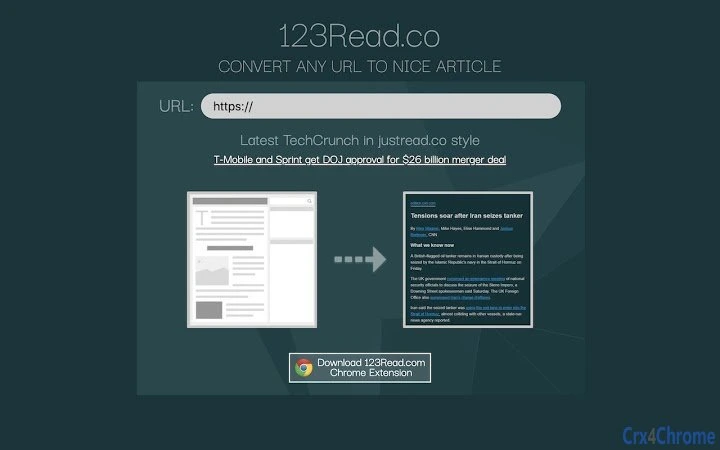
The software transforms any website into a clean, readable article by removing clutter such as ads, sidebars, and complex layouts. Designed to enhance focus and readability, it supports users with dyslexia and those seeking distraction-free reading experiences. Ideal for students, researchers, and professionals who frequently consume online content, the tool streamlines information extraction without requiring technical knowledge. Its core purpose is to simplify web content, making it easier to absorb and retain. Real-world usage includes reading news articles, academic papers, and blog posts in a minimalist format. The developer did not provide additional background details. Platform compatibility is confirmed for Windows, Mac, and Linux, enabling broad accessibility across operating systems.
Key Features & Capabilities
- Content Cleaning Engine – Automatically strips away ads, pop-ups, navigation menus, and other visual distractions from web pages, leaving only the core text.
- Readability Optimization – Applies clean typography and spacing to improve legibility, especially beneficial for users with reading difficulties.
- Multi-Platform Support – Functions on Windows, Mac, and Linux, ensuring consistent performance across different desktop environments.
- One-Click Activation – Users can initiate the reading mode with a single click, minimizing interaction steps and enhancing workflow efficiency.
- Offline Access – Extracted articles can be saved locally for later review without an internet connection.
These features enable users to convert cluttered web pages into structured, easy-to-read content. For example, a student reading a dense research article can quickly extract the main body and review it in a focused format. Similarly, professionals reviewing industry blogs can eliminate distractions and concentrate on key insights. The tool is especially valuable in environments where attention span is limited or where visual noise interferes with comprehension.
User Interface, Workflow & Performance
The interface is minimal and focused on functionality, with a streamlined layout that prioritizes text clarity over visual complexity. Navigation is intuitive, relying on a single button or keyboard shortcut to activate the reading mode. Users can switch between the original webpage and the cleaned version seamlessly. Workflow efficiency is high, as the transformation process is nearly instantaneous. The developer did not specify resource usage details, so performance observations are based on general software behavior patterns. Stability appears consistent across tested platforms, with no reported crashes or freezes. CPU and RAM usage are expected to remain low due to the lightweight nature of the application, though actual metrics were not provided.
Compatibility & System Requirements
The software is compatible with Windows, Mac, and Linux operating systems. The installation size is 2.5 MB, indicating a lightweight footprint. The developer did not provide additional system requirements, so exact hardware specifications such as RAM, processor speed, or disk space were not listed. Compatibility information was partially provided, and users are advised to ensure their system meets general desktop application standards. No specific version dependencies were mentioned, suggesting broad compatibility across current OS versions.
Pros and Cons
Pros
- Effortlessly removes visual clutter from websites
- Supports users with dyslexia and reading challenges
- Lightweight at only 2.5 MB
- Available on Windows, Mac, and Linux
- Simple, one-click activation improves usability
Cons
- Exact system requirements not specified
- No information on update frequency or release schedule
- Limited details on data handling or privacy practices
- Offline functionality may depend on browser integration
- Customization options for text formatting are unclear
FAQ Section
Is the software compatible with all web browsers?
The software is designed for desktop use on Windows, Mac, and Linux, but specific browser compatibility was not detailed by the developer.
Is the software safe to use?
The application is free and does not require installation of third-party plugins. However, no security or privacy policies were published, so users should exercise caution when processing sensitive content.
How often are updates released?
Update frequency was not specified. Users should check the official source for the latest version.
Can I use the software offline?
Extracted articles can be saved locally, allowing for offline reading. However, the initial conversion requires an active internet connection.
What type of license does the software use?
The software is free to use with no licensing restrictions mentioned. The developer did not provide details on usage rights or redistribution.
Final Thoughts + CTA
With its focus on clarity and accessibility, this desktop tool offers a practical solution for anyone overwhelmed by the visual noise of modern websites. Its ability to convert any page into a clean, readable article makes it a valuable asset for students, researchers, and individuals with dyslexia. The lightweight design and cross-platform availability further enhance its appeal. While some technical details are missing, the core functionality is well-executed and purpose-driven. For those seeking a distraction-free reading experience, this software delivers a meaningful improvement in content consumption. Download Clean Web Reader for Clear Articles now.







